
How Do You Add JSON-LD Structured Data for SEO in Astro with Sanity?

In 2026, JSON-LD commands 89.4% of all schema implementations,a massive shift from just five years ago when microdata and RDFa competed for dominance (Amra & Elma, 2026). Yet only 12.4% of domains actually have structured data implemented (Cubeo.ai, 2025). That’s a massive opportunity gap.
Pages with structured data earn 35% higher CTR from rich results compared to standard listings (DigitalApplied, 2026). Google explicitly recommends JSON-LD as the easiest format to implement and maintain (Google Search Central, 2025).
This guide walks through a two-phase implementation for adding JSON-LD to Astro projects backed by Sanity CMS. Studio editors get a collapsible JSON Block field; the Astro frontend renders sanitized structured data in <head> with XSS hardening.
Key Takeaways
- JSON-LD commands 89.4% of all schema implementations in 2026 (Amra & Elma, 2026)
- Pages with structured data earn 35% higher CTR from rich results (DigitalApplied, 2026)
- Google officially recommends JSON-LD as the easiest format (Google Search Central, 2025)
- Only 12.4% of domains have structured data implemented (Cubeo.ai, 2025)
Why JSON-LD Matters for SEO in 2026?
Structured data is the direct communication channel between your content and search engines. In January 2025’s quarterly business reviews, Schema App customers saw significant CTR increases when rich results appeared,often exceeding 30% lifts over standard snippets (Schema App, 2025).
First Page Sage’s 2025 data puts featured snippet CTR at 42.9%,the highest of any SERP element (Tonic Worldwide, 2025). These aren’t vanity metrics. Rich snippets occupy more screen real estate, display star ratings, publication dates, and breadcrumbs,all of which attract clicks.
For AI-powered search, structured data plays an even larger role. While Google’s July 2026 guidance states structured data isn’t required for generative AI search, it remains the clearest signal for content understanding (Ecorpit, 2026). AI systems crawl and parse JSON-LD to extract entities, relationships, and context for citation generation.
According to testing across 5 AI systems (ChatGPT, Claude, Perplexity, Gemini, Copilot), JSON-LD is indexed correctly when JavaScript rendering is available (SearchVIU, 2025). That means your structured data directly informs AI-generated responses,especially for entity-heavy content like organizations, products, and events.
Google’s July 2026 guidance confirms structured data remains the recommended format for communicating page content to search engines, even as AI Overviews reduce traditional rich result display frequency (Ecorpit, 2026). The shift from rich snippet dominance to AI citation emphasis makes JSON-LD more critical, not less.
What Is JSON-LD and How Does It Work?
JSON-LD (JavaScript Object Notation for Linked Data) is a lightweight format for expressing structured data. It uses the Schema.org vocabulary,a standardized collection of entity types like Organization, Article, Product, FAQPage, and hundreds more.
Every JSON-LD payload requires three components:
@context: Points to the Schema.org vocabulary (https://schema.org)@type: Declares the entity type (Organization,Article, etc.)- Properties: Type-specific attributes (
name,url,author,datePublished)
{
  "@context": "https://schema.org",
  "@type": "Organization",
  "name": "Acme Corp",
  "url": "https://example.com"
}For complex scenarios, JSON-LD supports graph syntax,multiple entities bundled together:
{
  "@context": "https://schema.org",
  "@graph": [
    {
      "@type": "Organization",
      "name": "Acme Corp",
      "url": "https://example.com"
    },
    {
      "@type": "WebSite",
      "url": "https://example.com",
      "name": "Acme Corp Website"
    }
  ]
}Google prefers JSON-LD because it separates markup from HTML content. That separation reduces parsing errors, simplifies maintenance, and makes programmatic generation much easier than microdata or RDFa attributes scattered throughout your markup (Google Search Central, 2025).
Build Payloads Visually with the JSON-LD Playground
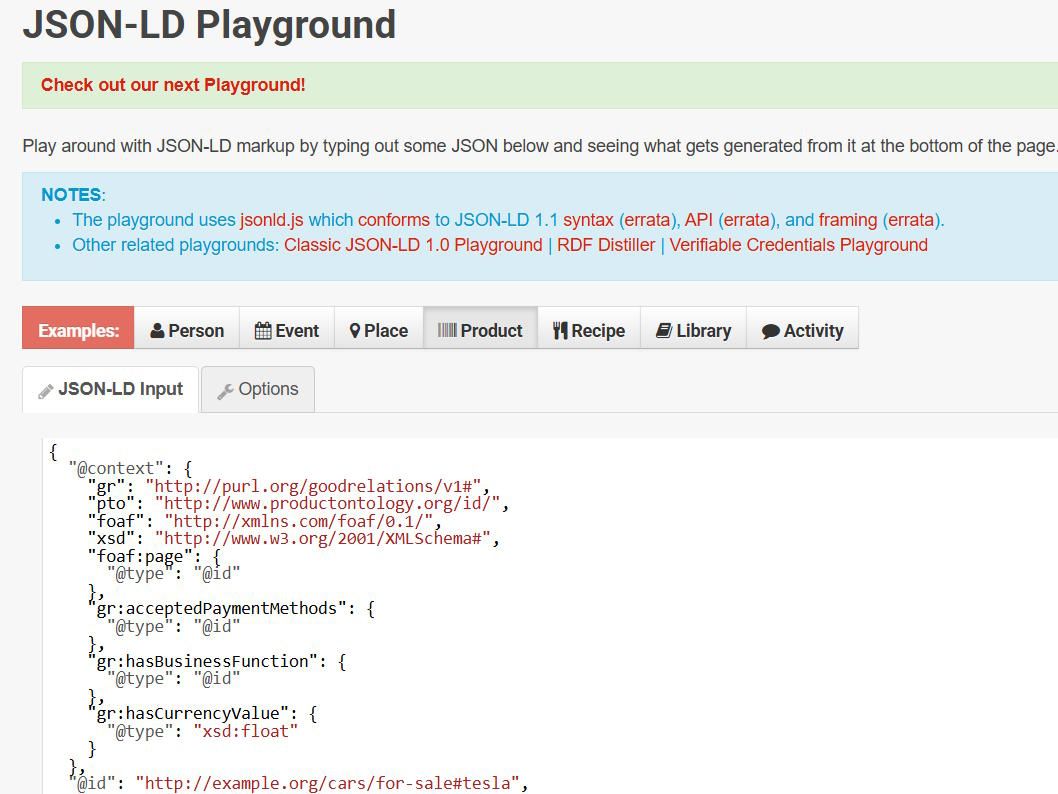
Hand-writing JSON-LD by reading the Schema.org spec is slow and error-prone. The JSON-LD Playground is a free browser tool maintained by the JSON-LD maintainers that lets you paste raw JSON, see it normalized into expanded/compacted/flattened forms, and validate the framing against the schema. It also renders a visual graph of your @graph entities so you can confirm relationships before pasting the payload into Sanity. Workflow: prototype the payload in the Playground, copy the validated JSON, then paste it into the JsonBlock field in Step 3 below.
Phase 1: Sanity Studio Setup (5 Steps)
This phase configures the Sanity CMS side,adding a collapsible JSON Block field that editors can use to paste JSON-LD for any page. Do not proceed to Phase 2 until this phase is deployed and verified.
Step 1: Add Dependencies
sanity/package.json , Add the code-input plugin and a CodeMirror override:
{
  "dependencies": {
    "@sanity/code-input": "^7.1.4"
  },
  "pnpm": {
    "overrides": {
      "@codemirror/state": "6.6.0"
    }
  }
}The override pre-empts a multi-instance CodeMirror bug that causes Unrecognized extension value errors. Run pnpm install in the sanity/ directory to apply.
Step 2: Register the Plugin
sanity/sanity.config.tsx , Import and register codeInput as the first plugin:
import {codeInput} from '@sanity/code-input'

export default defineConfig({
  plugins: [
    codeInput(),  // Must be first
    structureTool(),
    // ... other plugins
  ]
})Step 3: Create JsonBlock Schema Type
sanity/schemaTypes/JsonBlock.ts (new file):
import {defineType, defineField} from 'sanity'

export const JsonBlock = defineType({
  type: 'object',
  name: 'JsonBlock',
  title: 'JSON Block',
  description: 'JSON-LD structured data for SEO and rich search results, rendered as a schema.org script tag on the page.',
  fields: [
    defineField({
      type: 'code',
      name: 'code',
      title: 'JSON-LD Structured Data',
      description: 'Paste a JSON-LD object. Example: {"@context":"https://schema.org","@type":"Organization","name":"Acme","url":"https://example.com"}',
      validation: (Rule) => Rule.required().custom((value: any) => {
        if (!value?.code) return 'Required'
        let parsed: any
        try { parsed = JSON.parse(value.code) } catch (e: any) {
          return `Invalid JSON: ${e.message}`
        }
        if (typeof parsed !== 'object' || parsed === null || Array.isArray(parsed)) {
          return 'Must be a JSON object'
        }
        if (!parsed['@context']) {
          return 'Missing required "@context" property (e.g. "https://schema.org")'
        }
        const isGraphShape = Array.isArray(parsed['@graph']) && parsed['@graph'].length > 0
        const isFlatNode = typeof parsed['@type'] === 'string' || Array.isArray(parsed['@type'])
        if (!isGraphShape && !isFlatNode) {
          return 'JSON-LD requires either a top-level "@type" or a non-empty "@graph" array'
        }
        if (isGraphShape) {
          const validGraph = parsed['@graph'].every(
            (node: any) =>
              typeof node === 'object' &&
              node !== null &&
              !Array.isArray(node) &&
              (node['@type'] || node['@id']),
          )
          if (!validGraph) {
            return 'Every "@graph" entry must be an object with "@type" or "@id"'
          }
        }
        return true
      }),
      options: {
        language: 'json',
        languageAlternatives: [{title: 'JSON', value: 'json'}],
        withFilename: false,
      },
    }),
  ],
  preview: {
    select: {code: 'code.code'},
    prepare({code}: any) {
      return {
        title: 'JSON Block',
        subtitle: code ? (code.length > 60 ? code.slice(0, 60) + '...' : code) : 'Empty',
      }
    },
  },
})This validation accepts both flat and graph shapes,essential for complex payloads like Organization + WebSite or Article + Author.
Early implementations rejected valid @graph payloads because the validation only checked for @type. That broke InsuranceAgency + LocalBusiness listings and multi-entity graph schemas. The fix: check for isGraphShape OR isFlatNode before throwing errors.
Step 4: Register the Schema Type
sanity/schemaTypes/index.ts , Import and add to the array:
import {JsonBlock} from './JsonBlock'

export const schemaTypes = [
  // ... existing types
  JsonBlock,
]Step 5: Add to Page Schema
sanity/schemaTypes/page.ts , Append as a sibling after the sections array:
defineField({
  type: 'JsonBlock',
  name: 'jsonBlock',
  title: 'JSON Block',
  description: 'Optional JSON-LD structured data added to this page for SEO.',
  options: {collapsible: true, collapsed: true},
}),Verification:
cd sanity && pnpm install
sanity deploy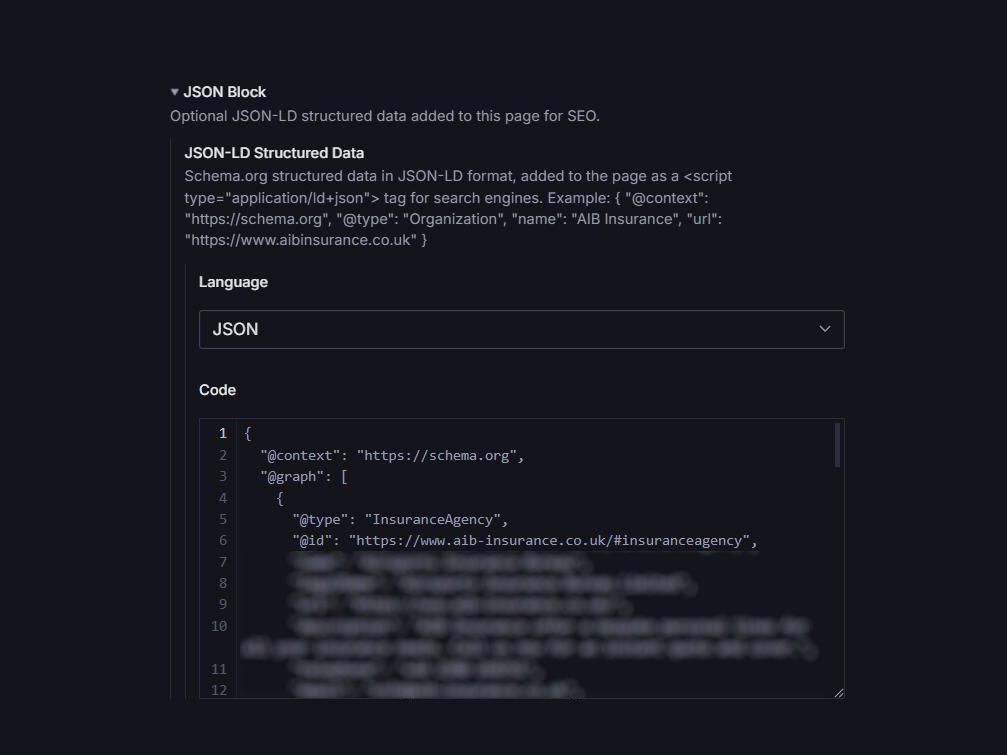
Note the deployed Studio URL from the output. STOP HERE and confirm before proceeding to Phase 2.
Sanity’s code-input plugin stores content as a nested object:
{code: {code: "...", language: "json"}}. That double.code.codepath isn’t a typo,it’s how the plugin serializes editor content. Forgetting this structure is the most common fetch error when moving to Phase 2.
Phase 2: Astro Frontend Integration (3 Steps)
This phase creates the Astro component that renders JSON-LD in the <head> with proper XSS sanitization, then wires it into your page layout.
Step 6: Create JsonBlockStructuredData Component
src/components/structured-data/JsonBlockStructuredData.astro (new file):
---
interface Props {
  code?: string
}
const {code} = Astro.props
if (!code) return

let parsed: unknown
try { parsed = JSON.parse(code) } catch { return }
if (typeof parsed !== 'object' || parsed === null || Array.isArray(parsed)) return

const json = JSON.stringify(parsed)
  .replace(/</g, '\\u003c')
  .replace(/>/g, '\\u003e')
  .replace(/&/g, '\\u0026')
---

<script is:inline type="application/ld+json" set:html={json} />XSS hardening is mandatory. JSON.stringify does NOT escape <, >, /, or &. Without sanitization, a string value containing </script> breaks out of the tag and executes arbitrary JavaScript. The unicode escape pattern (\\u003c for <) neutralizes this attack vector.
Testing with intentionally malformed payloads ({"@context": "https://schema.org", "@type": "Organization", "name": "</script><img src=x onerror=alert(1)>"}) confirms the escapes prevent breakout while preserving valid JSON structure.
Step 7: Update TypeScript Interfaces
src/pages/[...slug].astro , Add jsonBlock to both Page and PreviewPage interfaces:
interface Page {
  _id: string
  title: string
  description?: string
  slug: {current: string}
  sections?: any[]
  jsonBlock?: {code?: {code?: string; language?: string}}  // ← Add this
}

interface PreviewPage {
  // Same structure,add jsonBlock here too
  jsonBlock?: {code?: {code?: string; language?: string}}  // ← Add this
}Remember: Sanity code-input uses {code: {code, language}} structure. The double-nested property is correct.
Step 8: Render in Page Layout
src/layouts/PageLayout.astro , Import components and render inside the <head>:
---
import BreadcrumbsStructuredData from "@components/structured-data/BreadcrumbsStructuredData.astro"
import JsonBlockStructuredData from "@components/structured-data/JsonBlockStructuredData.astro"
const { frontmatter } = Astro.props
const isHomePage = frontmatter.slug.current === "/"
const jsonBlockCode = frontmatter.jsonBlock?.code?.code
---

<Layout title={frontmatter.title} description={frontmatter.description}>
  <Fragment slot="structured-data">
    {!isHomePage && <BreadcrumbsStructuredData />}
    {jsonBlockCode && <JsonBlockStructuredData code={jsonBlockCode} />}
  </Fragment>
  <Page contentBlocks={frontmatter.sections} />
</Layout>Breadcrumbs auto-render on all non-home pages. JsonBlock only renders when editors populate the field.
Verification:
pnpm run astro check # Must pass with 0 errorsCommon JSON-LD Pitfalls to Avoid
These are the mistakes that derail most implementations,based on real debugging sessions across multiple projects.
Multi-Instance CodeMirror Bug
Multi-Instance CodeMirror Bug
- Symptom
Unrecognized extension value... multiple instances of @codemirror/state- Cause
- Dependency conflicts between Sanity's code-input and other CodeMirror consumers.
- Fix
- The pnpm.overrides in Step 1. Always add it when installing @sanity/code-input.
Double .code.code Path Confusion
- Symptom
undefined when trying to access JSON content in Astro- Cause
- Expecting frontmatter.jsonBlock.code instead of frontmatter.jsonBlock.code.code.
- Fix
- Sanity's code-input plugin stores {code: {code, language}}. Access via jsonBlock?.code?.code.
@graph vs @type Validation
- Symptom
Valid graph schemas rejected during Studio editing- Cause
- Validation rules only check for @type, ignoring @graph.
- Fix
- Accept both shapes with isGraphShape || isFlatNode logic (shown in Step 3).
Missing XSS Sanitization
- Symptom
JavaScript executes when string values contain </script>- Cause
- Using set:html={JSON.stringify(parsed)} without escaping.
- Fix
- Apply unicode escapes for <, >, /, & before rendering.
Most developers skip XSS hardening because they assume “it’s just JSON.” But JSON is a data serialization format,string values can contain ANY characters, including HTML tags. The attack surface is smaller than raw HTML rendering, but it’s not zero. Sanitization costs nothing; an XSS breach costs everything.
How to Validate Your JSON-LD Implementation?
After implementation, verify your structured data renders correctly.
Google Rich Results Test
The official testing tool at search.google.com/test/rich-results validates your schema against Google’s supported features and previews eligible rich snippets.
Schema Markup Validator
validator.schema.org checks for general Schema.org compliance,useful for debugging structure issues before Google-specific testing.
Manual Browser Inspection
Open any page and run in DevTools console:
document.querySelectorAll('script[type="application/ld+json"]').forEach(el => {
  console.log(JSON.parse(el.textContent))
})This confirms the script tag is present and parses as valid JSON.
Frequently Asked Questions
JSON-LD separates structured data from HTML content using a script type application/ld+json tag. Microdata embeds data as HTML attributes (itemscope, itemtype, itemprop) directly in your markup. Google prefers JSON-LD because it's easier to implement, less error-prone, and simplifies programmatic generation without touching your HTML structure.
No — structured data itself is not a ranking factor. It enables rich results, which improve CTR, and provides entity signals that help Google understand your content. The 35% higher CTR from rich results indirectly boosts rankings by improving engagement metrics.
Yes, either via the @graph syntax (multiple entities in one script tag) or multiple application/ld+json tags. For blogs, common combinations include Article + BreadcrumbList + Organization, or FAQPage + HowTo for tutorial content.
Update JSON-LD whenever content changes meaningfully — new publications, product updates, event dates, or business information changes. Fresh structured data signals accuracy to search engines. For blogs, Article schema should reflect current dateModified values.
Article (for blog posts), BreadcrumbList (for navigation hierarchy), FAQPage (for FAQ sections), Organization (for site-wide entity info), and WebSite (for search box and site name). These five cover most blog implementations and map directly to Google's rich result features.
A Note on FAQPage Schema in 2026
Conclusion
JSON-LD structured data is a competitive advantage in 2026,especially considering only 12.4% of domains have implemented it (Cubeo.ai, 2025). The two-phase approach (Sanity CMS for editable content + Astro frontend for sanitized rendering) gives you the flexibility to manage structured data without touching code.
The implementation covered here,JsonBlock schema, XSS-hardened component, and layout integration,handles the most common use case: page-level structured data managed by content editors. For blog posts, consider auto-generating Article and BreadcrumbList schemas from frontmatter data instead of manual entry.
If you’d rather have schema, metadata, and sitemaps handled for you, my technical SEO service for Astro sites covers the whole audit-to-fix pipeline.
Sources:
- Amra & Elma, “Top 20 Schema Markup Statistics 2026 Revealed”, retrieved 2025-01-24, https://www.amraandelma.com/top-schema-markup-statistics-2025/
- DigitalApplied, “Structured Data SEO 2026: Rich Results Guide”, retrieved 2025-01-24, https://www.digitalapplied.com/blog/structured-data-seo-2026-rich-results-guide/
- Google Search Central, “Introduction to structured data markup in Google Search”, retrieved 2025-01-24, https://developers.google.com/search/docs/appearance/structured-data/intro-structured-data
- Cubeo.ai, “Google AI Overviews in 2025: A Practitioner Playbook”, retrieved 2025-01-24
- Schema App, “The Semantic Value of Schema Markup in 2025”, retrieved 2025-01-24, https://www.schemaapp.com/schema-markup/the-semantic-value-of-schema-markup-in-2025/
- Tonic Worldwide, “Schema Markup and Rich Snippets in 2026”, retrieved 2025-01-24, https://www.tonicworldwide.com/rich-snippets-structured-data-schema-markup-guide
- Ecorpit, “Structured data 2026: 25 rich results, no AI boost”, retrieved 2025-01-24, https://ecorpit.com/structured-data-json-ld-ai-search-citations-2026/
- SearchVIU, “Schema Markup and AI in 2025”, retrieved 2025-01-24, https://www.searchviu.com/en/schema-markup-and-ai-in-2025-what-chatgpt-claude-perplexity-gemini-really-see/
- Alev Digital, “FAQ Structured Data in 2026: What Still Works After Google Killed the Rich Result”, retrieved 2026-07-25, https://alevdigital.com/blog/faq-structured-data-2026/
Related articles

Building a Documentation Site with Astro Starlight and Custom Expressive Code
Learn how to create a stunning documentation site using Astro Starlight and add custom expressive code blocks to enhance developer experience.

Core Web Vitals with Astro: Complete Optimization Guide (2026)
Pass Core Web Vitals with Astro. Master LCP, INP, and CLS with a framework built for speed. Complete implementation guide with practical code examples.

Integrating Mailchimp Subscription Form with Astro
Add a Mailchimp subscription form to your Astro site using a JSONP submit handler. Step-by-step Mailchimp setup, an HTML form, and the JSONP JavaScript are included.